AI-Native vs. AI-Assisted Transaction Management Software
What is AI-native transaction management software, and how is it different from the dozen other tools that now put "AI" in their name? If you are evaluating software to run your transactions in 2026, you want one clear distinction that tells you what you are actually buying. Here it is: AI-native software reads the raw contract and acts on it without you setting up the workflow first, while AI-assisted software waits for you to build the workflow and then helps you run it faster. The rest of this guide makes that line concrete, walks through what it looks like on a real file, and shows why the difference compounds the more deals you run.
The word "AI" has stopped meaning much on its own. Almost every transaction management platform claims it now, and most of them are telling the truth in a narrow sense: there is an AI feature in there somewhere. But there is a real and growing gap between a tool that uses AI to help you do your existing process and a tool that was built so the AI does the process. That gap is the difference between AI-assisted and AI-native, and once you can see it, you cannot unsee it on a demo.
What is AI-native transaction management software?
AI-native transaction management software is a platform built so that artificial intelligence reads the raw inputs of a deal, the contract, the addenda, the inbox, and acts on them directly, without you first building templates, rules, or workflows for it to follow. The AI is the engine that runs the file, not a helper bolted onto a system you configure by hand.
This matches how the broader software world has settled on the term. As IBM puts it, "AI native" refers to something designed from the ground up with AI as a core component, not bolted on later as a mere feature. The intelligence is structural. Take it out and the product does not just lose a feature, it stops working the way it is supposed to.
That is a different claim from "AI-powered" or "AI-enabled," and the distinction matters, so it is worth keeping them separate. An AI-powered tool has AI somewhere in it. An AI-native tool is organized around the AI doing the core work. A platform can be powered by AI and still be, at its heart, a manual system you set up by hand. AI-native is specifically what happens when the AI does the reading, not just the responding.
AI-assisted vs. AI-native: who is the intelligence layer?
The cleanest way to tell AI-assisted from AI-native is to ask a single question: who is the intelligence layer, you or the software?
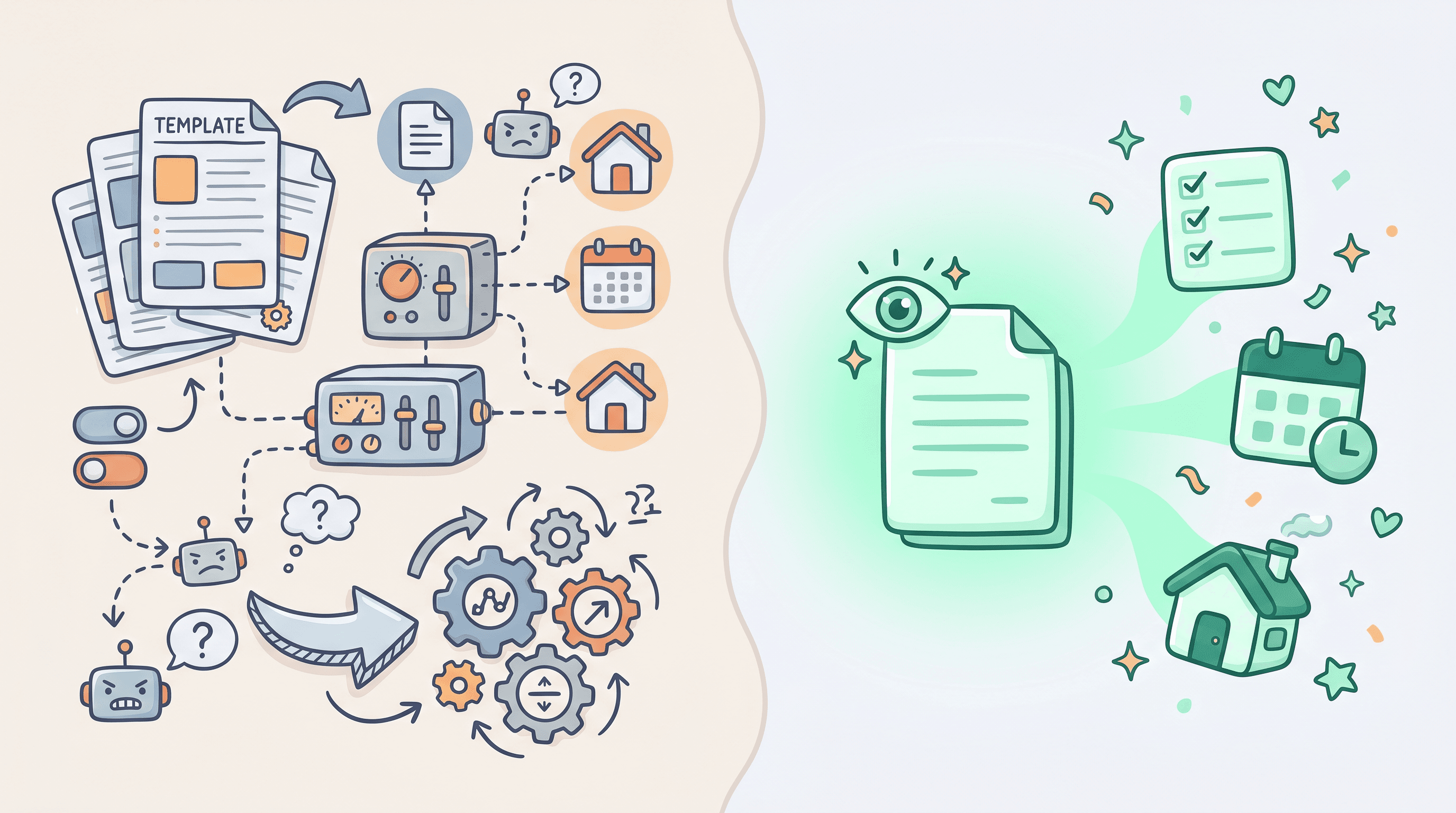
In an AI-assisted tool, you are the intelligence layer. You still define the workflow. You build the templates, set up the deadline rules, map out the email triggers, and tell the system what a deal in your state looks like. Once that scaffolding exists, the AI helps you move through it faster. It drafts a paragraph, fills a field, suggests the next step, autocompletes a task. That is genuinely useful, and it is real AI. But the thinking about how a deal should run still lives in your head and in the setup you did. The AI is an assistant working inside a structure you created.
In an AI-native tool, the software is the intelligence layer. You hand it the contract, and it reads the document the way a coordinator would: pulling the parties, the property, the price, the financing terms, and every date, including the relative ones like "ten days after acceptance" or "three business days before closing." It builds the timeline and the checklist for that specific deal, in that specific state, because it understood the contract, not because you picked a template. You did not define the workflow. The AI derived it from the raw input.
This is the same line venture investors now use to separate real AI companies from repackaged ones. The Founder's Guide from CRV calls it the difference between AI-native and AI-enabled, where an AI-native product cannot exist without its intelligence layer. Apply that test to transaction software. If you removed the AI from an AI-assisted tool, you would still have a working transaction platform: templates, checklists, a calendar, all the manual machinery you set up. If you removed the AI from an AI-native tool, there would be nothing left to set up the file at all, because reading the file was the whole product.
If you want the adjacent distinction, the one between AI and plain automation, we cover that separately in AI vs. automation for transaction coordinators. Automation follows rules you write. AI-native software figures out the rules from the document. This article is about the layer above that: the split between AI tools that assist your workflow and AI tools that are the workflow.
What AI-native looks like on a real file
Abstract definitions are easy to nod along to and hard to act on, so picture an actual contract landing in your inbox at 4pm on a Friday.
With an AI-native platform, you upload the executed purchase agreement and the AI engine, in ListedKit's case that engine is Ava, reads it in about sixty seconds. It extracts the buyer and seller, the agents, the lender, the purchase price, the earnest money, and every contingency window. It calculates the inspection deadline, the financing deadline, the appraisal date, and the closing date, doing the business-day math for you. Then it builds the task checklist and the timeline for that deal. You did not choose a template, you did not enter a single date, and you did not configure a state profile first. You uploaded a PDF and reviewed a finished file. You can watch exactly that happen, since your first transaction is free, so you can run one of your own contracts through it before you decide anything.
It keeps going past intake. Ava watches the inbox, reads incoming email, and matches each message to the right deal by context, so a lender note that lands Saturday morning is already attached to the correct file before you open your laptop Monday. None of that required you to write a routing rule or tag the thread. The system worked from the same raw materials a human coordinator works from, the documents and the messages, which is the deeper feature story behind how AI contract reading works.
Now run the same Friday file through an AI-assisted tool. You open the deal, pick the right template for your state, and the AI offers to help. It might autofill a few fields once you point it at the PDF, suggest a deadline based on the date you typed, or draft a welcome email after you tell it which template to use. Helpful, faster than fully manual, but every one of those steps still routes through a structure you stood up first. The AI is assisting your setup. It is not replacing it.
Why the difference compounds at volume
On a single file, the gap between AI-assisted and AI-native can look small. Both get you to a built file. The difference is what each one costs you per file, and that cost is where the two paths separate as you grow.
Here is the math that matters. An AI-assisted tool at forty active files still requires you to set up forty files. The per-file overhead, choosing the template, entering or confirming dates, wiring up the reminders, drafting the first emails, does not disappear, it just gets a little faster. Multiply a "little faster" by forty and you still have most of a workweek in setup before anyone has talked to a client. An AI-native tool at forty active files needs forty contracts uploaded. The reading, the timeline, and the checklist come from the documents, so the overhead that scales with your file count is mostly gone.
The numbers behind this are not subtle. The average residential transaction carries around 47 tracked deadlines across the parties involved, and coordinators routinely report entering twenty to thirty due dates by hand for every new contract. Deadline tracking alone runs two to four hours per file manually versus fifteen to thirty minutes with AI tools. The AI-assisted version trims that. The AI-native version removes the part that scales with volume, which is the part that caps how many files one person can carry.
That is why this is a buyer-level question, not a feature preference. A team lead choosing an AI-assisted tool is choosing a setup tax that grows linearly with the business. A coordinator on an AI-native tool moves the ceiling instead, because adding the forty-first file means uploading one more PDF, not building one more file. As one TC business owner running deals on an AI-native system put it, "Your AI system is the only one out there that we've really seen like it right now. So it's not a matter of if we're going to use it, it's a matter of how we're going to optimize it." That is the posture the category shift produces: the question stops being whether to adopt and becomes how far to push it.
Three scenarios that separate the two
Definitions land harder when you watch them play out, so here are three moments where AI-assisted and AI-native diverge in practice.
A brand-new contract comes in. AI-assisted: you select the state template, point the tool at the PDF, confirm the fields it autofilled, and adjust the deadlines it suggested. AI-native: you upload the PDF and review a file the AI already built from reading it.
A Friday addendum extends the financing contingency by five days and pushes the closing date. AI-assisted: you find the affected deadlines, recalculate the dependent dates, update the calendar, and remember to notify three parties. AI-native: the AI reads the addendum, updates the affected dates, and drops the tasks that no longer apply, so you review a change instead of rebuilding the timeline.
An email lands with no property address in the subject line, just "Re: Re: quick question." AI-assisted: you search your inbox to figure out which of your thirty deals it belongs to. AI-native: the AI already matched it to the right file by context, so it is sitting on the correct deal when you look.
Across all three, the pattern is identical. The AI-assisted tool speeds up a step you still own. The AI-native tool owns the step. If you coordinate deals for a living, the solution built for transaction coordinators shows how those pieces fit together across a full book of business, and the broader category overview lives in our guide to real estate transaction management software.
How to tell which one you are actually looking at
Because nearly every tool now markets itself with the AI label, the burden is on you to tell native from assisted on a demo, and a few questions cut straight through the marketing.
Ask the vendor to upload a contract you bring, not one of their samples, and watch what happens next. If the tool reads it and builds the file, that is AI-native behavior. If the first thing it asks is which template to use or which fields to map, you are looking at an assisted workflow with an AI helper attached. Ask whether the system needs a state profile or template configured before it can handle a new contract. Ask whether incoming email gets matched to a deal automatically or whether you tag it. Ask the removal-test question in plain terms: if you turned off the AI, would there still be a product here, or would there be nothing to run a file with?
None of this means AI-assisted tools are bad. For a team that already has tight templates and wants the AI to shave time off a process they like, an assisted tool can be a perfectly good fit. The point is to know which one you are buying, because the two behave very differently as your file count climbs, and the label on the box will not tell you. For the deeper background on what the AI is actually doing under the hood, our explainer on what AI transaction coordination is breaks down the mechanics.
The bottom line
AI-native transaction management software is software where the AI reads your contracts and emails and acts on them directly, building the timeline, the checklist, and the deal file without you defining the workflow first. AI-assisted software keeps you as the intelligence layer: you build the structure, and the AI helps you move through it faster. Both are real uses of AI, and the difference looks minor on one file. It compounds on forty, because an AI-assisted tool still needs forty files set up while an AI-native tool needs forty contracts uploaded. The category is new and the AI label is everywhere, so the only reliable way to tell them apart is to watch what the software does with a raw contract. If it reads the file and builds it, that is AI-native, and you can see it happen on one of your own deals for free.