





For brokers and brokerage owners
Meet Ava, your AI assistant for real estate transactions.

Back your agents from contract to close

Ava helps your back office catch paperwork issues, fill forms, and prepare documents for signature. Your agents stay in the field. No new software for them to learn, just a new number to text for deal updates.

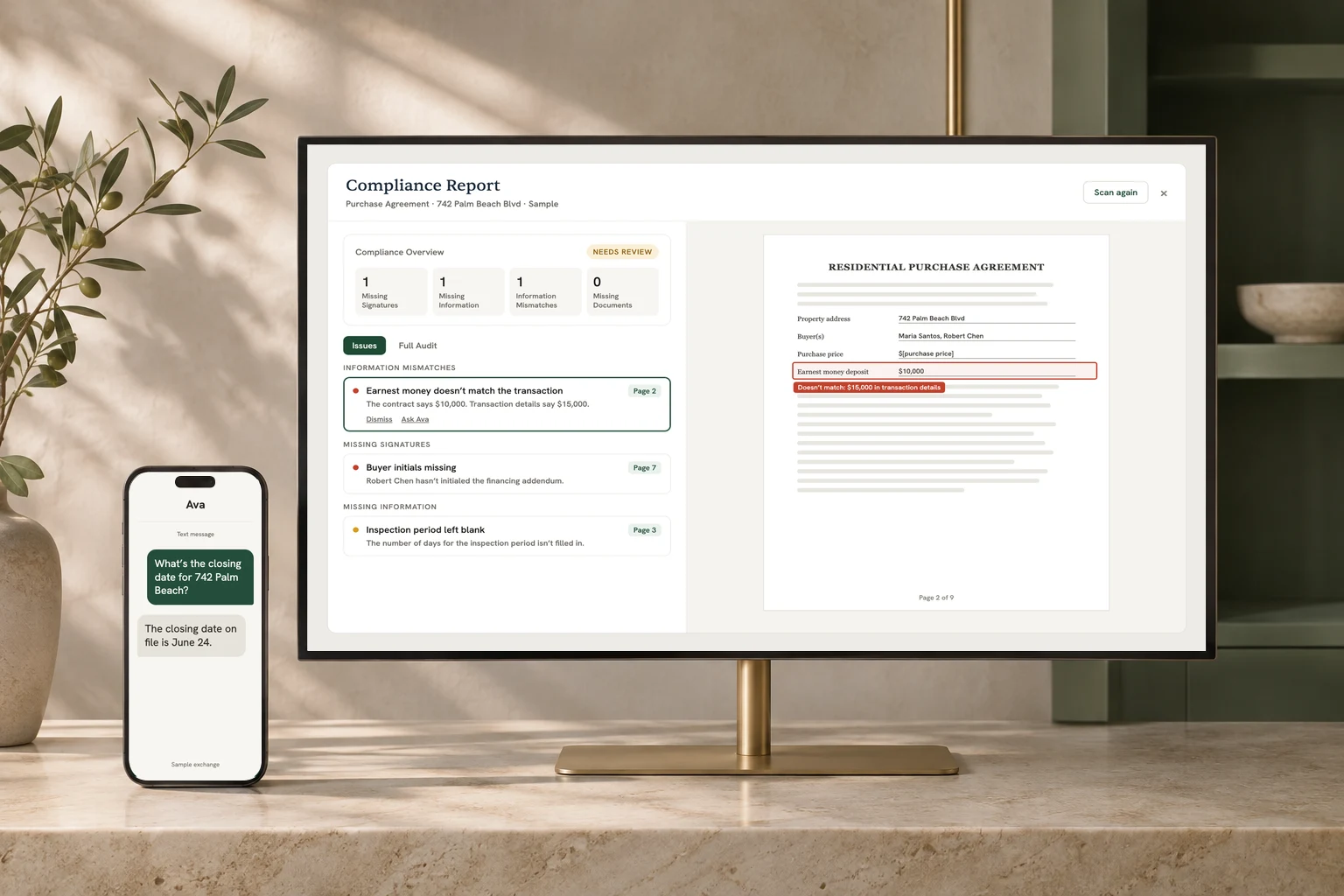
Illustrated brokerage workflow: a sample compliance report on a monitor and an agent texting Ava for the closing date on file.

Used by real estate professionals at brokerages including

Coldwell BankerWindermere Real EstateWeichert RealtorsRealty ExecutivesKeller WilliamseXp RealtyCompass

Meet your teammate

Meet Ava. More support for your agents starts in the office.

ListedKit is real estate broker software with Ava, your AI transactions assistant. She starts with your processes, communication preferences, and preferred vendors. As documents arrive, she flags issues and prepares forms, signature requests, and emails the way your team works. Your people review and approve.

Your agents’ source for updates

Give agents deal updates without a call to the office.

An agent at a showing can text Ava for the latest closing date or deadline on file. They get an answer without waiting for someone in the office to stop what they’re doing.

Your file reviewer

Catch paperwork issues as documents come in.

Ava checks incoming documents for missing signatures, blank fields, and details that don’t match, using your brokerage’s requirements. Staff see what needs attention while there’s time to follow up.

Your connection to business reports

Build reports in the AI assistant you already use.

Connect ListedKit to Claude, Codex, or another AI assistant that supports MCP. Ask it to build reports from your transaction data. For a fuller picture, bring in CRM or accounting data through separate connections.

Your form filler and eSign assistant

Handle paperwork issues before they hold up the deal.

Ava fills forms with the deal details, adds signature fields, assigns them to the right parties, and prepares the request in minutes. Your staff review and send. Signatures are tracked, and the signed copy is filed automatically.

Your email drafter

Give your staff more time to support your agents.

Ava drafts introductions, replies, and update emails using the deal details and your templates. Ask her to prepare related deadline changes, then review the work and send when ready.

Your view across the office

Know where someone needs a hand.

See active deals, overdue tasks, and completed work across your staff. Open the shared file for context, so you can offer help without asking everyone for a status report.

Carrie Hensley

Director of Business Operations
SCH Real Estate

Twenty-three agents. Fewer calls to the admin team.

At SCH Real Estate, two transaction coordinators support 23 agents alongside operations and the broker. Working a new contract used to take one to two hours. Carrie says Ava has cut that time in half or better.

Agents can see progress on their own files, which Carrie says has meant fewer calls to admin. Her staff get help with intake and drafting, and agents have more of the information they used to call the office for.

“It’s cut in half, if not more, for every time we do a contract.”
Read SCH’s story

Start with one file, not a brokerage-wide rollout.

Bring your coordinator or office manager. See the work Ava prepares and decide where she can help your brokerage.

  1. Pick a representative file

    Choose a contract with your staff. Upload it, or connect the admin inbox where deal updates arrive.

  2. Review the work together

    Ava reads the contract, flags missing items, builds the timeline, and drafts introductions. Staff review the details and send.

  3. See what it gives back

    Have an agent try texting Ava for the date on file. See where staff save time and which findings need follow-up before adding more files.

Before your brokerage gets started

What does setup look like, and how long does rollout take?

Setup help is complimentary. In three 30-minute calls, we help your team connect the admin inbox, add your SOPs and templates, and review the workflow together so you’re ready for agent rollout. Start with your coordinator or office manager. Agents can keep their usual routine and text Ava’s number for deal updates once they have access to their files.

Do our agents have to learn new software?

No. Your back office works with Ava while agents keep their usual routine. Once your staff give them access to their files, agents can text Ava’s number for the latest deal details on file. They don’t have to learn the back-office software.

How is Ava different from ChatGPT or Claude?

Ava works inside ListedKit with real estate workflows for deadlines, paperwork, and compliance. From setup, she works from your processes and learns how your team manages transactions and likes to communicate. She keeps your preferred vendors on hand based on the property. That context carries into the forms, signature requests, and emails she prepares for review. You can also connect ListedKit to a general-purpose assistant like Claude or ChatGPT through MCP for business reporting.

Connect ListedKit to your AI assistant
Is our data used to train AI models?

No. Our AI service provider does not use your data to train its models. Your transaction information is stored in your ListedKit account, with access controlled by workspace permissions. It isn’t publicly accessible. Service providers process data to deliver ListedKit’s features as described in our privacy policy. If you connect a separate AI assistant through MCP, its data-use settings and policies also apply.

Read our privacy policy
Where does Ava fit in our current tools?

ListedKit brings transaction files, deadlines, email, form filling, and eSign into one place. That can reduce separate spreadsheets, manual checklists, and signing tools. Keep your CRM, accounting software, and any compliance archive your brokerage requires. In a demo, we can walk through your current process and identify what to keep, connect, or replace.

See how Ava Sign works
What does it cost for our brokerage?

For brokerages, start with Max: $499/month for four admins and up to 50 active closings at once, with unlimited agents at no extra cost. Add admin seats and closing capacity as needed. For volume beyond Max, contact us for pricing tailored to your brokerage.

See plans and pricing