For in-house transaction coordinators and admin teams
Real estate transaction coordinator software that keeps every file current.
Your TCs should be managing closings, not keeping software updated all day. Ava reads the inbox, the contracts, and the addenda across every file in the office and keeps each one current, so the team works the exceptions and the handoffs.
- Every incoming email matched to the right file, even with no property address in the subject line
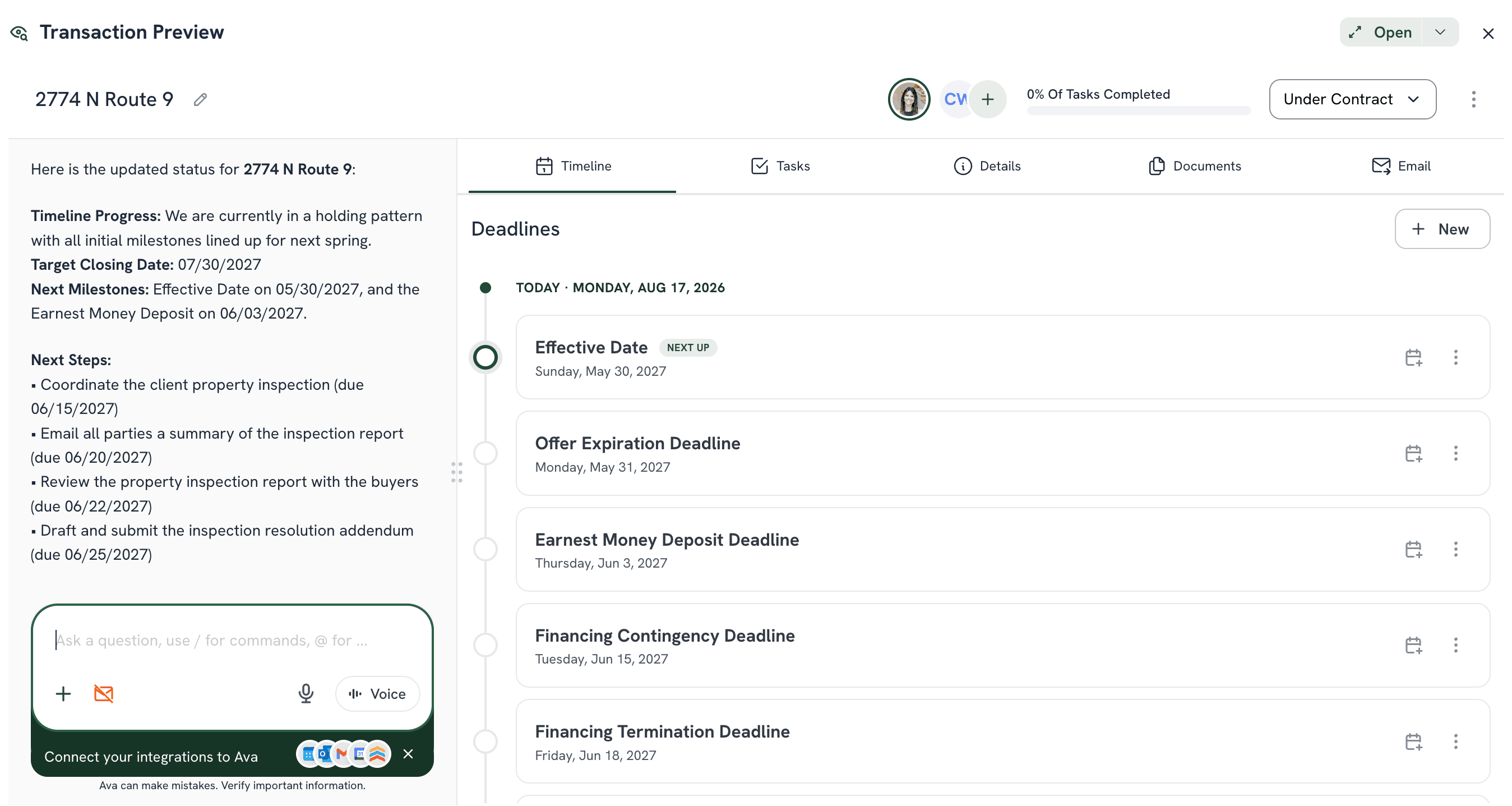
- Contract in, timeline and checklist built on your office's standards, in under 2 minutes
- Missing items and deadline changes flagged as documents arrive, so handoffs carry the context
Deals one coordinator can carry
Same coordinator. Same service quality. No extra headcount. Reported by TCs running their books on Ava.
Real activity across the ListedKit network
Real activity across the ListedKit network, June 2026
Trusted by real estate teams across the country





The daily workflow
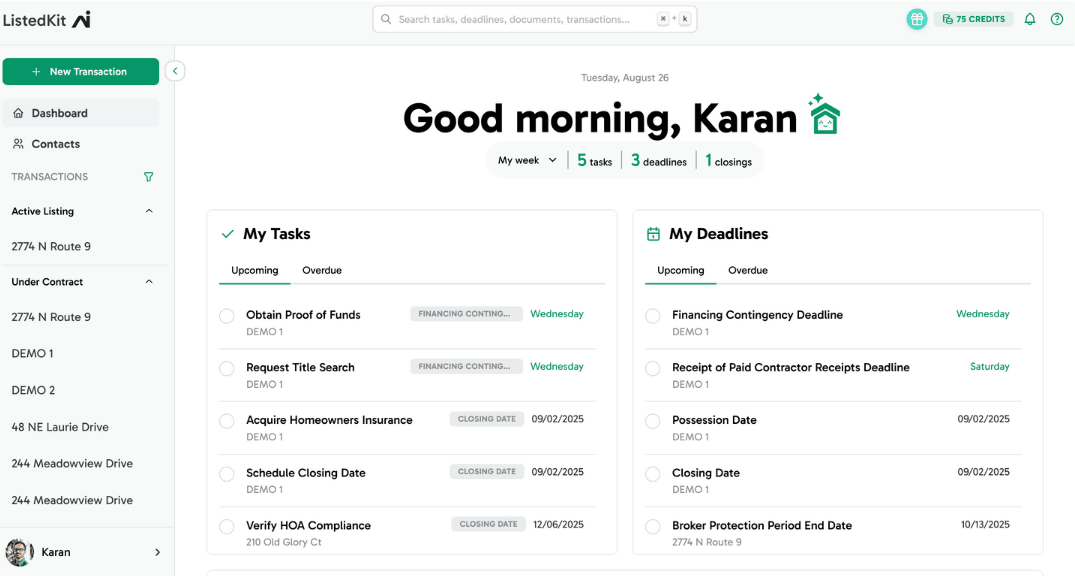
The work Ava does before your TC opens the file
Ava handles the repetitive context work: reading, matching, extracting, and updating. Review, judgment, and coordination stay with the person running the file.
Inbox monitoring
Every email matched to the right file the moment it arrives, even with no property address in the subject line. You read what needs a decision, not the whole inbox.
Contract intake
Ava reads the purchase agreement, counters, and addenda at intake and extracts every date, party, and term, shown next to its source text so the review takes seconds.
Timeline building
The timeline is built from the contract on your office's rules, synced to Google Calendar or Outlook, and updated when a counter or extension changes a date.
Document chasing
Ava knows which documents the file references but does not yet include, and drafts the follow-up so the chase is a send, not a search.
Missing-item context
Missing signatures, blank fields, and mismatched dates are flagged as documents arrive, so the file tells you what is wrong before anyone has to ask.
Email drafting
Updates to lenders, title, and the other side drafted with the deal's names, dates, and property filled in, sent from your own Gmail or Outlook only when you say so.
Handoffs
When a file moves between an agent, a TC, and compliance, the context moves with it, because the file is current rather than a summary in someone's head.
Office-level standards
Paste the brokerage checklist and rules once. Every coordinator runs the same intake on the same standard, whichever agent the file came from.
The intake transformation
Before Ava. After Ava.
Before
You open your laptop to the office's 40 active deals and 80 unread emails. The first 30 minutes go to triage: which email belongs to which deal, which one needs a response today, which one is buried in a thread from three weeks ago. You read every new intake manually because you can't risk missing a date, then type what changed into the transaction system. By 11am you've handled triage, intake, and updates, and you haven't done any actual transaction work yet.
With Ava
Every email is already in the right deal file. The contract is already read. The timeline is already built, and it already reflects yesterday's addendum. You open the deal and Ava tells you what needs attention today. You start at the work, not the triage, and nothing waits on someone typing a status.
What your day looks like when Ava handles the intake
Ava reads the contracts, keeps the timelines current, and watches the inbox so the coordinator's day goes to the closings, the agents, and the problems that need a person.
Why in-house TCs move inbox and intake to Ava
Reads contracts and keeps timelines current
Contract analysis, timeline calculations, and deadline tracking that updates when a counter or extension changes a date
Works in the Gmail, Outlook, and calendar the team already uses
Emails go out from the coordinator's own account and timelines sync to the office calendar
Runs your office's standards on every file
Paste the brokerage checklist once and every intake follows it, whichever coordinator or agent is on the file
Built for the brokerage's transaction desk
Review and judgment stay with the TC
Ava does the reading, matching, and extracting, and shows every field next to its source so the coordinator verifies in seconds. Deciding what to do about the missing disclosure is still their call.
- Every extracted date and party shown beside the source text
- Missing items and mismatches flagged, with the decision left to you
- Emails drafted with the deal's names and dates, sent only when you say so
Capacity for the office without another hire
When the context work is gone, one coordinator carries more files at the same service level, and the next hire on the desk becomes a coordination decision rather than a data-entry one.
- More active files per coordinator without the quality dropping
- New TCs and admins productive on day one, on your process
- Coverage when someone is out: the file is current, not in someone's head
Built for every role on the transaction team
In-house TCs and admins
- Start the day at the work, not the triage
- Handoffs carry the file's context, not a summary typed at 6pm
- Fewer status questions from agents and leadership, because the file answers them
Lead TCs, ops managers, compliance
- One intake standard across every coordinator and every agent
- See which files are missing something or going quiet without asking
- Compliance checked as documents arrive, not only at file review
Running the transaction desk for a brokerage?
Ava gives every coordinator on the desk the same intake quality on the office's standards from day one, without the training overhead.
Before
You're running 5 coordinators across 80 active deals and you don't know what you don't know. One is organized. One is behind. One is new and you're not sure they're catching everything. An agent asked about a deadline and you had to go find out. Your process works when everyone follows it, and not everyone does.
With Ava
Every coordinator runs the same intake on the office's standards. Every file gets inbox matching and contract reading from day one. New hires are productive immediately because Ava walks them through the workflow. You see where every file stands without calling anyone, and volume grows by credits, not by another hire.
What our users say
Trusted by transaction coordinators.
“The ability for Ava to read the contracts and documents.”
“I like how it reads my documents and acts as an extra set of eyes.”
“…It removes the constant worry that I forgot something and the endless searching for documents and double-checking myself.”
Want the full picture?
See how transaction teams run on Ava, from solo coordinators to 25-person teams.
Read customer stories →Questions
Frequently asked questions
What is real estate transaction coordinator software?
Real estate transaction coordinator software is the tool a TC or admin uses to run a file from contract to closing: the timeline, the task list, the documents, the parties, and the communication with each of them. Most of it is passive, meaning it tracks what the coordinator enters, so the coordinator spends a large part of the day reading email and re-typing what changed. ListedKit AI works differently. Ava reads the inbox, the contracts, and the addenda across every active file and keeps each one current, so an in-house TC team manages the closings and the exceptions instead of keeping the software updated by hand. It sits in front of the transaction management system your brokerage already requires rather than replacing it. Read about the broader transaction management software category.
What is an AI transaction coordinator?
An AI transaction coordinator is software that uses artificial intelligence to handle the routine parts of real estate transaction coordination: reading contracts, calculating deadlines, tracking documents, matching email to the right file, and drafting communication. It works alongside the coordinator, not as a replacement. With ListedKit AI, Ava reads your purchase agreements, extracts key dates and parties, builds the transaction timeline, and keeps it current as the deal changes, while the TC keeps the review, the judgment calls, and the coordination.
Can Ava help an in-house TC team manage 30 or 40 active deals at once?
Yes. Ava reads the inbox and the contracts across every active deal in the office at the same time. Every incoming email is matched to the right file automatically, every contract is read at intake with the timeline built within minutes, and every addendum updates the file it belongs to. Teams carrying 30 to 40 active deals per coordinator use Ava for intake, triage, and keeping the record current, so the coordinator's day goes to the work that needs a person.
How does Ava fit an in-house transaction team at a brokerage?
Give Ava the office's checklist and rules once and every coordinator runs the same intake on the same standard, whichever agent the file came from. Agents work their own deals, TCs and admins run the files, and the lead TC or operations manager sees which files are missing something or going quiet without asking anyone. Handoffs carry the file's full context because the file is current, not a summary in someone's head. New TCs and admins are productive on day one because Ava walks them through the workflow.
Does Ava replace the transaction coordinator?
No. Ava removes the repetitive context work: reading, matching, extracting, and updating. The coordinator keeps everything that needs judgment: deciding what to do about the missing disclosure, negotiating a repair credit, calling the lender who has gone quiet, and managing the relationships on the deal. Ava shows every extracted field next to its source text so the review takes seconds instead of a re-read, and nothing goes out without the TC saying so.
How is ListedKit AI different from hiring another admin or a virtual assistant?
Another person needs training, supervision, and time off, and they still spend their day reading email and updating the system. Ava works on every transaction the moment it arrives, with the same accuracy on the fortieth file as the first: reading contracts in seconds, calculating timelines, matching email, and drafting communication on your templates. There are no training costs, no onboarding period, and no coverage gaps. The next hire on your transaction desk becomes a coordination decision rather than a data-entry one, starting at $14.99 per intake.
What integrations does ListedKit AI support?
ListedKit AI integrates with Gmail and Outlook for sending emails directly from your account (no AI branding), Google Calendar and Outlook Calendar for syncing transaction timelines and deadlines, and Follow Up Boss for CRM syncing. Ava works with any state's purchase agreement format, including handwritten contracts.
Do I need technical skills to use AI for transaction coordination?
No technical skills are required. You upload a contract, and Ava reads it, extracts the key details, calculates deadlines, and builds your transaction timeline. The interface is designed for transaction coordinators, not engineers. Most TCs are fully up and running within their first transaction.
What types of contracts can Ava read?
Ava reads any state's purchase agreement in real time, with no pre-setup or template configuration required. This includes standard purchase agreements, addendums, counteroffers (following logic across multiple counteroffers to find final terms), and even handwritten contracts with human-level accuracy. Ava extracts dates, parties, property info, financials, and calculates complex timelines like '7 business days before closing' automatically.
How much does ListedKit AI cost for a transaction coordinator team?
ListedKit AI is priced per transaction, starting at $14.99 per intake, with no per-seat fees, so the whole transaction desk works under one account and a coordinator who opens no new files in a slow month costs nothing. Your first intake is free so the team can see how Ava reads a real contract and keeps it current through closing. There are no setup fees, no monthly minimums, and no long-term contracts. See pricing details.
How does Ava compare with other transaction coordinator software?
Most transaction coordinator software organizes the coordinator's work: checklists, tasks, documents, and client communication. It is useful, and it still depends on someone typing in what changed. Ava's difference is that it reads the email, contracts, and addenda itself and keeps the file current, so the team manages exceptions instead of updating software. We keep an honest roundup of the alternatives, with verified pricing, who each tool is for, and their limitations, for teams comparing options. Compare the best transaction coordinator software.
Is there a transaction coordinator checklist I can use with Ava?
Yes. Our free contract-to-close checklist covers all eight phases from pre-contract through post-closing, and it doubles as the office standard a brokerage can run across every file. Paste your version of it into Ava's rules once and Ava applies it on every deal, turning the static list into a live timeline that updates as documents and email arrive. Download the transaction coordinator checklist.
See exactly how much time your team is losing to manual coordination
Get your Transaction Coordination Score and see how much of the desk's week goes to keeping software updated instead of managing closings.
Takes 30 seconds. Get your results instantly.
Keep reading
Explore More
Comparing options, looking for the task list, or evaluating the broader category? Start here.
See Ava keep a transaction current.
Upload one real contract from your desk and watch Ava read it, build the timeline, and flag what is missing. Your first intake is free, with no setup fees and a two-minute start.
Usage-based pricing starting at $14.99 per intake. See pricing.