Ai Automation
How to Automate Your TC Checklist (Without Losing Your Process)
How do the TCs handling 30+ files a month keep everything straight without missing deadlines or letting things slip through the cracks?
It's not superhuman memory. It's not working 80-hour weeks. It's having a system that tracks every task automatically, flags what needs attention today, and updates everything downstream when dates change. The difference between a TC stuck at 12 files and one scaling to 40 comes down to one thing: a checklist that actually works for you instead of creating more work.
This guide shows you how to automate your transaction coordinator checklist without abandoning the process you've spent years refining. You'll learn the three levels of checklist automation, how AI changes the game, and exactly what to look for in software that won't force you to start from scratch.
The Manual Checklist Problem
Here's a number that should make you pause: a typical real estate transaction includes 198 individual tasks bound by strict deadlines and legal requirements. According to data from the National Association of Realtors, a real estate deal takes approximately 45 hours to finalize, with roughly 36 of those hours dedicated to paperwork alone.
That's not a checklist. That's a second job hiding inside every transaction.
The real problem isn't the number of tasks. It's what happens when you're managing those tasks manually across disconnected systems. You extract the closing date from the contract. You enter it in your timeline. You add it to your task list. You put it in Google Calendar. You include it in your welcome email to the buyer. That's the same piece of information entered five different places.
Then the closing date changes via amendment. Now you have to remember all five places you entered that date and update each one. Miss just one, and someone shows up on the wrong day. Or worse, a contingency deadline passes because you calculated "7 business days before closing" based on the old date.
If you're managing 15 transactions at once, you're not just tracking 198 tasks per deal. You're tracking nearly 3,000 tasks across your entire pipeline, each one with its own deadline, dependencies, and potential for human error.
This is why so many TCs hit a ceiling around 15-20 files. It's not a skills problem. It's a systems problem. And no amount of color-coded spreadsheets or reminder apps will fix it.
Want to see what a comprehensive checklist looks like before you automate it? Download our free transaction coordinator checklist to get the baseline.
What "Automating Your Checklist" Actually Means
Not all automation is created equal. When software companies say "automate your checklist," they could mean three very different things.
Level 1: Template Automation
This is the most basic form. You create a checklist template, and the software applies the same list to every new transaction. Better than starting from scratch each time, but you're still manually adjusting dates and tasks for each deal. Most traditional TC software stops here.
Level 2: Trigger Automation
A step up. When you complete Task A, Task B automatically appears or gets assigned. When you mark "Inspection Complete," the system creates "Review Inspection Report" for the next day. This reduces the mental load of remembering what comes next, but you're still doing all the initial setup manually.
Level 3: AI Automation
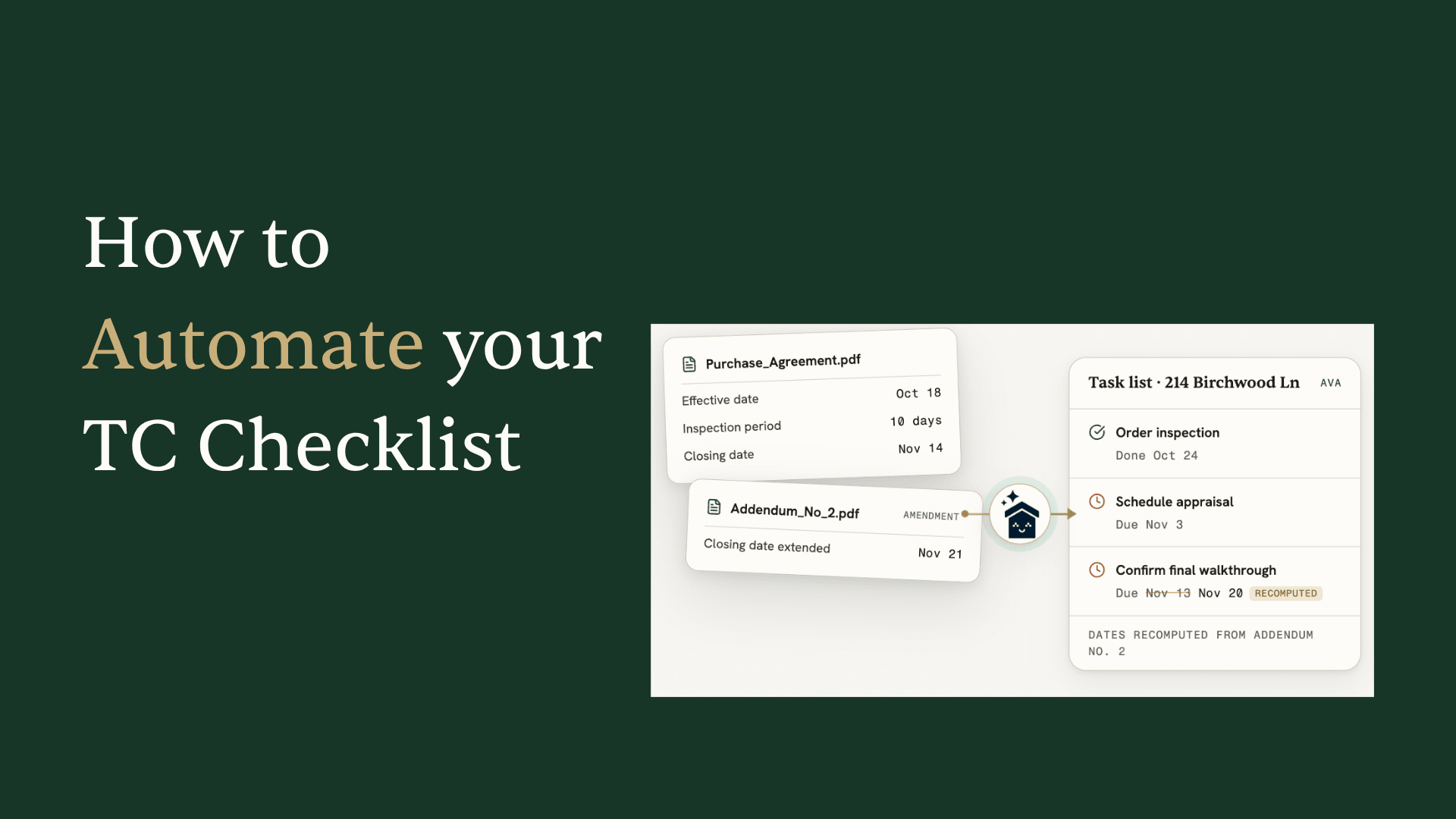
This is where things actually change. The system reads your contract, understands what it says, and generates the relevant tasks automatically. Upload a purchase agreement, and it extracts the closing date, inspection period, financing contingency, all the parties involved, and creates your entire task list based on what's actually in that specific contract.
The difference matters more than you might think. RealTrends reports that AI is expected to deliver 30% productivity gains for transaction coordinators in 2026. But that's only true if you're using actual AI, not just template automation with a chatbot bolted on.
Here's the test: Can the software read a handwritten amendment and update your timeline? Can it figure out that "7 business days before closing" means something different when there's a federal holiday in between? Can it follow the logic across three counteroffers to find the final agreed terms?
If yes, that's AI automation. If no, it's just templates with extra steps.
Understanding this distinction is crucial. We wrote an entire guide on AI vs automation for transaction coordinators if you want to dig deeper into what separates real intelligence from marketing buzzwords.
The Time Math
Let's get specific about what automation actually saves you.
Manual Contract Intake: 20-30 minutes
Reading through a purchase agreement, extracting the closing date, buyer and seller names, property address, earnest money amount, inspection periods, financing contingencies, and entering all of that into your system. If it's a counteroffer chain, add another 10-15 minutes to figure out which terms are final.
Manual Task Creation: 15-20 minutes
Looking at your checklist template, adjusting dates based on this specific contract, calculating "10 days from acceptance" or "7 business days before closing," and entering each task with its correct due date.
Manual Updates When Dates Change: 10-15 minutes each time
And dates change constantly. Amendment moves closing by a week? That's every timeline-dependent task that needs recalculating. On average, expect 2-3 date changes per transaction.
Add it up: you're spending 60-90 minutes per transaction just on checklist management. Over a month with 20 transactions, that's 20-30 hours of manual data entry and task juggling.
According to Transactly, transaction coordinator services save agents an average of 16 hours per transaction. Even if you're the TC (not outsourcing), the math is similar. Automation that handles contract reading and task generation gives you back a significant chunk of that time.
The capacity impact is real. Industry data shows AI platforms enable single coordinators to handle 2-3x more transactions efficiently. That's not about working faster. It's about eliminating the busy work that doesn't require your expertise in the first place.
Think about it: Does reading a contract and typing "Closing Date: March 15" into five different fields require your professional judgment? Or is that exactly the kind of task a computer should handle while you focus on actually coordinating the transaction?
How to Automate Your Checklist: 3 Approaches
Here's the practical part. You have three paths to checklist automation, and the best choice depends on how refined your current process is.
Approach 1: Import Your Existing Process
If you've spent years perfecting your checklist, you don't want to throw it away. The right automation tool lets you bring your existing process into the system.
Upload a PDF of your current checklist. Copy and paste from your spreadsheet. Export from your current software (Open to Close, Aframe, Folio, or wherever you're tracking tasks now). Good AI will extract the tasks automatically, preserve the order you've established, and turn your static list into a dynamic template.
This is the path for TCs who say, "My process works. I just need it to work faster."
The key is finding software that doesn't force its workflow on you. Your inspection task should stay "Coordinate Buyer Walkthrough" if that's what you call it, not get renamed to whatever the software developer decided was the "correct" term.
Approach 2: Let AI Generate From Contracts
What if you don't have a refined process yet? Or what if you're tired of maintaining templates for every transaction type, every state, every brokerage quirk?
AI contract reading flips the model. Instead of starting with a template and adjusting for the specific deal, you start with the specific deal and let AI generate the relevant tasks.
Upload the purchase agreement. AI reads it in seconds, extracts all the key dates, identifies the parties involved, notes the contingencies and special terms. Then it creates tasks based on what's actually in that contract.
California PRDS with a 17-day inspection contingency? Tasks generated for that timeline. Texas contract with a different earnest money structure? Tasks adjusted accordingly. New Jersey deal that requires attorney review? AI catches that from the contract language and adds the appropriate tasks.
The magic is in complex date calculations. When a contract says "inspection contingency must be satisfied 7 business days before closing," AI handles the math. It knows to exclude weekends. It accounts for federal holidays. It works backward from the closing date. And when closing moves, it recalculates everything automatically.
Approach 3: Hybrid (The Best of Both Worlds)
Most experienced TCs land here. You have base templates for your standard process, but AI supplements them with transaction-specific tasks and handles all the date calculations.
Start with your proven workflow. Layer in AI reading to catch anything specific to this contract. Add templates mid-transaction when situations arise.
This is where chat-based AI shines. Three weeks into a transaction, you discover it's in an HOA community. Instead of manually finding and applying your HOA checklist, you just say, "Hey Ava, add the HOA task list." AI finds the most relevant template based on your request and the transaction context, shows you a preview of what it's about to add, and applies it with one confirmation.
Need something more specific? "Add inspection follow-up tasks, assign them to me, due dates based on our inspection deadline." AI figures out what you need and makes it happen.
This hybrid approach means you're not abandoning years of process refinement, but you're also not manually managing every edge case. Learn more about Ava's task management capabilities to see this in action.
What to Look For in Automation Software
Not every tool that claims "checklist automation" will actually solve your problems. Here's what separates software that works from software that creates more work.
Must Actually Read Contracts
This is the big one. Can the software read your purchase agreement and extract information? Or does it just store the PDF while you manually type everything into fields?
Test it: Upload a contract and see what happens. Does it pull the closing date, buyer names, property address, and key contingencies automatically? Or does it sit there waiting for you to tell it what's in the document?
Must Calculate Complex Dates
"7 business days before closing" is not the same as "7 days before closing." Good software knows the difference. It should handle business day calculations, account for weekends, and ideally know about federal holidays that might fall in your timeline.
Test it: Set up a task with a complex date formula. Change the closing date. Does everything downstream update automatically? Or do you have to recalculate manually?
Must Update Downstream When Dates Change
Closing gets pushed back two weeks. In good software, you change the date once and every timeline-dependent task adjusts. In bad software, you spend 20 minutes manually updating each task.
This is where most "automation" tools fail. They're fine when you set things up initially, but they create more work when reality doesn't match the original plan. And in real estate, reality never matches the original plan.
Must Work With Any State's Contracts
If you work across states, or even if you occasionally get a relocation client, your software shouldn't need special configuration for each state's contract forms. AI that reads contracts should understand any standard purchase agreement without you pre-loading templates for every state.
ListedKit works with contracts from any state without pre-setup. Upload a California PRDS or a Texas TREC form, and Ava reads it the same way. No template matching. No state-specific configuration. Just actual contract understanding.
Must Let You Keep Your Process
The whole point of automation is to save time, not to spend weeks learning a new workflow. If software requires you to abandon your existing process and adopt theirs, calculate how long it takes to rebuild everything you've refined over years.
Good tools adapt to you. They import your templates, respect your task naming, and enhance your workflow instead of replacing it.
How Ava Automates Your Checklist
Let me show you what this looks like with ListedKit's AI assistant, Ava.
You upload a purchase agreement. Within 60 seconds, Ava reads the entire document. Not just the first page. Not just the fields in predictable locations. The whole contract, including handwritten amendments, counteroffer chains, and addenda.
She extracts closing date, possession date, inspection deadlines, financing contingency periods, earnest money amounts, all the parties with their contact information, property details, and every other term that matters for your timeline.
Then she builds your task list. You can apply your existing templates (paste them in once, Ava extracts and saves them), let Ava generate tasks based on the contract, or combine both. Your base process plus transaction-specific additions.
Three weeks in, you realize there's an HOA involved. Open the chat: "Hey Ava, add the HOA checklist." She finds your HOA template, shows you a preview with the task count and key items, and applies it with due dates calculated from your transaction timeline.
Closing gets pushed back? Update it once. Ava recalculates every dependent deadline automatically. "7 business days before closing" adjusts. Inspection review periods adjust. Document deadlines adjust. You never manually recalculate.
She also catches problems before they become problems. Missing signature on page 12? Ava flags it during compliance scanning. Closing date in the amendment doesn't match what's in your timeline? She notices the mismatch. These aren't things you have to remember to check. They surface automatically.
The learning piece is important too. Ava remembers your preferences. She learns from your edits to improve future transactions. Upload a new template once, and it's available for every deal going forward. Your process gets encoded into the system instead of living only in your head.
Pricing is usage-based: $14.99 per intake with your first transaction completely free. No monthly subscription eating into slow months. No annual contract. You pay when you use it.
The Bottom Line
You don't have to choose between your proven process and modern automation. The right tool learns how YOU work and applies it to every deal automatically.
Manual checklist management made sense when software couldn't understand contracts. That's not the world anymore. AI reads faster than you can, calculates complex dates without errors, and updates everything downstream when plans change.
The TCs scaling to 30, 40, 50+ files per month aren't working twice as hard. They're working with systems that handle the busy work while they focus on actual coordination. The relationship management. The problem-solving. The expertise that makes them valuable.
Start with what you have. Import your existing process. Let AI handle the parts that don't require your judgment. And stop manually entering the same closing date into five different places.