Ai Automation
Stop Typing the Same Emails: How TCs Are Using AI Email Templates in 2026
How many times have you rewritten the same "welcome to your transaction" email this week, swapping out names, dates, and property addresses one by one?
If you're handling more than a handful of files, the answer is probably "too many." And here's the thing: the TCs handling 30+ files a month aren't doing this anymore. They're using AI email templates that pull directly from the contract, auto-fill every detail, and send from their own Gmail or Outlook in seconds. No copy-pasting from a Google Doc. No frantic find-and-replace before hitting send. No accidentally emailing the buyer with the seller's closing date.
This guide shows you exactly how AI email templates for real estate work, why they're replacing static copy-paste scripts, and how to start using them without overhauling your entire workflow.
The Real Cost of Rewriting Emails Every Transaction
Let's do some quick math. The average real estate transaction requires somewhere between 15 and 25 emails from the TC. Welcome emails, deadline reminders, document requests, inspection scheduling, closing coordination, lender updates. You know the list because you write it every single time.
Each of those emails takes a few minutes to customize. Swap the names. Update the dates. Double-check the property address. Change the contingency periods because this deal is in California and the last one was in Texas. According to The Close's 2026 real estate automation report, the average TC spends 20 to 30 minutes per transaction just on email communication.
Now multiply that by 20 transactions a month. That's somewhere between 6 and 10 hours every month spent rewriting emails you've already written a hundred times before. Hours you could spend taking on more files, following up on problem transactions, or (imagine this) actually closing your laptop before 8 PM.
But the time isn't even the scariest part. The scariest part is what happens when you rush. You send the wrong closing date to the listing agent. You mix up the buyer's name with the seller's. You forget to update the inspection deadline because the counteroffer changed it and you were working off an old template. These aren't hypothetical mistakes. Every TC has a horror story. And the worst ones happen when you're moving fast, juggling multiple files, and your brain is on autopilot.
Why Static Email Templates Stop Working at Scale
You probably started with static templates, and honestly, that was smart. Most TCs keep a folder somewhere (Google Docs, Dropbox, a Notes app on their phone) with their go-to emails. Buyer welcome. Seller welcome. Inspection reminder. Closing coordination. The classics.
The approach works great at 5 files a month. You have time to carefully swap names, triple-check dates, and proofread before sending. It starts to crack at 15 files. And by 30? You're flying through find-and-replace so fast that mistakes become inevitable.
Here's why static templates break down:
- You still manually swap every single variable: names, dates, addresses, contingency periods, agent info
- When a counteroffer changes the timeline, you have to remember which template you sent and whether it had the old or new dates
- There's no connection between your templates and the actual contract data
- Every state has different terminology and deadlines, so you need multiple versions of the same template
- When you're on your phone between showings, good luck finding and editing the right template from a Google Drive folder
Resources like Dotloop's 19 TC email templates and DocJacket's 30 free email scripts are genuinely useful starting points. But they all share the same fundamental limitation: they're static text that you manually customize every time. The template doesn't know anything about your actual transaction.
This is the gap that AI is filling for transaction coordinators. Not by replacing your templates with some generic robot text, but by making your templates smart enough to fill themselves in.
How AI Email Templates Actually Work
So what does an AI email template actually look like? It's not some sci-fi autocomplete. It's your existing email style, supercharged with transaction awareness.
Here's the core idea: when you use a platform like ListedKit, Ava (the AI assistant) has already read your contract. She knows the buyer's name, the seller's name, the property address, the closing date, the inspection deadline, the lender's contact info, the earnest money amount. All of it. Extracted automatically when you uploaded the contract.
So when you create an email template, instead of writing "Dear [BUYER NAME]" and manually replacing it every time, you use a smart placeholder like {{buyer_name}}. When you insert that template into an email, Ava fills it automatically from the contract data. No typing. No mistakes.
But here's where it gets really interesting. Smart placeholders go way beyond simple name swaps. You can write AI instructions directly inside your templates:
- {{list all upcoming deadlines this week}} and Ava generates a formatted list of this week's deadlines pulled from your transaction timeline
- {{explain the financing contingency in 3 bullets}} and Ava reads the actual contract terms and writes a clear explanation
- {{summarize inspection issues requiring seller response}} and Ava pulls from the inspection report you uploaded
This is the difference between a static template and an AI-powered email template. The static version gives you a blank to fill in. The AI version fills itself in, using the actual data from your actual transaction.
And it works everywhere. Desktop, mobile, tablet. You're at a showing and need to send a quick deadline reminder? Pull up the template, one click to insert, Ava fills the details, and you're sending from your phone in under 30 seconds.
From "Congrats, Spruce It Up" to a Polished Email in Seconds
Templates are great for recurring emails you send on every transaction. But what about the one-off emails? The congratulations message. The "hey, closing got moved to Friday" update. The response to a confused buyer asking why the earnest money deposit increased after the counteroffer.
This is where AI email drafting comes in, and it's separate from (but works alongside) templates.
Here's how it works with Ava: you type a quick prompt. Something like "congrats, buyer is in escrow, send timeline, spruce it up." That's it. Those seven words. Ava takes your vague direction and turns it into a polished, professional congratulations email that includes the buyer's name, the property address, the key dates from the contract, and an attached transaction timeline. All accurate. All current.
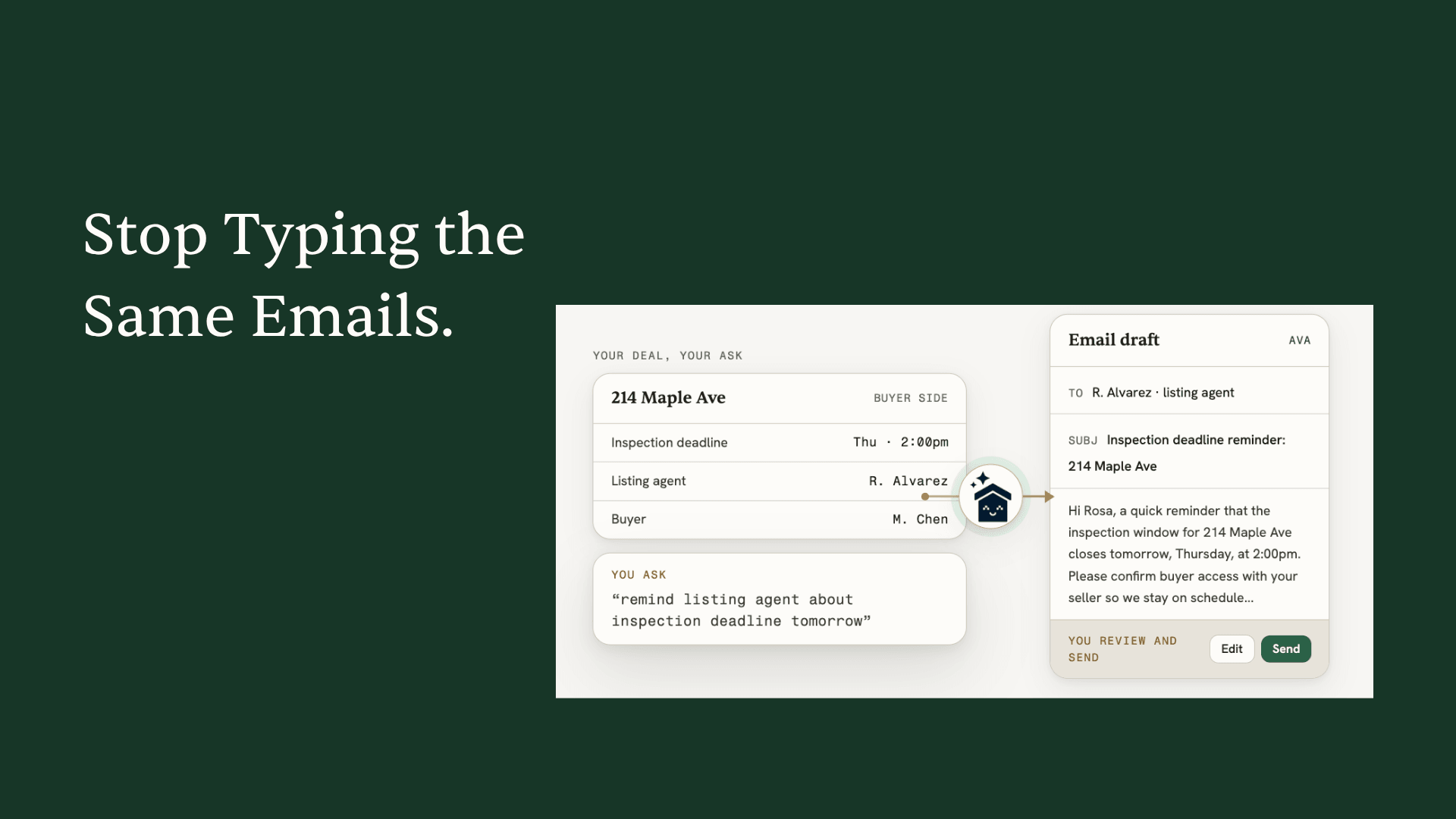
Want to remind the listing agent about tomorrow's inspection deadline? Type "remind listing agent inspection tomorrow." Ava drafts a professional reminder with the exact inspection date, time window, property address, and the agent's name. All pulled from the contract.
Need to update all parties that closing moved? "Tell everyone closing is now March 14." Ava drafts individual emails to the buyer, seller, both agents, the lender, and title company, each with the updated date and relevant context.
And here's the detail that gives TCs goosebumps: every email Ava drafts sends directly from your Gmail or Outlook account. The email automation feature connects to your actual email. No "sent via ListedKit" branding. No third-party sender address. Your clients see an email from you, because it is from you. Ava just did the writing.
One TC put it this way after seeing the Gmail integration for the first time: "Talk goosebumps." Another said simply, "That's perfect. Yes." Not because the technology is flashy, but because it solves a real, daily, grinding pain point without adding any friction to their workflow.
What TCs Are Actually Saying About AI Email
The feedback pattern is consistent. TCs don't get excited about AI in the abstract. They get excited when they see it do something they've been wasting time on for years.
"This is pretty cool" was one reaction from a TC watching Ava turn a three-word prompt into a complete email with all the correct transaction details. Not a canned response. Not a generic template. An email that referenced the actual parties, the actual dates, and the actual terms from the contract sitting in their dashboard.
The Gmail integration moment is where skepticism usually dies. TCs are (rightfully) protective of their client relationships. The last thing anyone wants is for clients to feel like they're getting robot emails. When they see that Ava sends from their own inbox, with their own signature, and the recipient has zero indication that AI was involved, the reaction is almost always some version of: "Wait, really? That's it?"
That's the whole point. The best transaction coordinator tools don't add complexity. They remove steps you were already doing, without anyone noticing the difference except you (and your suddenly free calendar).
Import Your Existing Templates in Minutes
If you've spent months or years building up a library of email templates, you don't have to throw them away to start using AI templates. This is a common concern, and it's a valid one. Your templates represent your voice, your process, your client experience.
Here's what the migration actually looks like: you can drag and drop your existing email files directly into ListedKit. Or copy and paste multiple messages at once. Ava converts them into smart templates automatically, identifying where to place smart placeholders based on the content. Your buyer welcome email becomes an AI-powered buyer welcome email that auto-fills from every new contract.
You can also save any email Ava drafts as a new template with one click. So when she writes a particularly good closing coordination email, you keep it, add smart placeholders where you want them, and now it's part of your library forever.
Templates can be shared with your team or kept private. If you're training new TCs, shared templates mean they're sending professional, accurate emails from day one, using your proven messaging, with every detail auto-filled from the contract.
And if you don't have templates yet? Grab our free transaction coordinator email scripts as a starting point. Twenty-five proven templates covering every phase from contract to closing. Import them into ListedKit and they become AI-powered instantly.
The Static vs AI Template Comparison
To make this concrete, here's what the same email looks like both ways.
Static template (the old way):
"Hi [BUYER NAME], congratulations on your accepted offer on [PROPERTY ADDRESS]! I'm [YOUR NAME], your transaction coordinator, and I'll be guiding you through closing. Your estimated closing date is [CLOSING DATE]. The inspection contingency deadline is [INSPECTION DATE]. I'll be sending you a timeline with all key dates shortly. Please don't hesitate to reach out with any questions."
To send this, you open the template, manually replace five fields, double-check the dates against the contract (because was the inspection deadline 10 days or 15?), and hope you didn't grab the closing date from the original offer instead of the counteroffer that moved it.
AI template (the new way):
"Hi {{buyer_name}}, congratulations on your accepted offer on {{property_address}}! I'm your transaction coordinator, and I'll be guiding you through closing. Your estimated closing date is {{closing_date}}. The inspection contingency deadline is {{inspection_deadline}}. {{list next 3 upcoming deadlines with dates}}. Please don't hesitate to reach out with any questions."
To send this, you click insert. Done. Ava fills every field from the contract she already read. The dates are accurate because they came from the source document, not your memory. And that {{list next 3 upcoming deadlines}} instruction? Ava generates a custom list based on the actual timeline for this specific transaction.
Same email. Same professional tone. Same client experience. But one takes 5 minutes and carries error risk. The other takes 5 seconds and doesn't.
Getting Started with AI Email Templates
If you're curious about making the switch, the barrier is lower than you'd think. Your first intake on ListedKit is completely free, and that includes all email features: templates, AI drafting, Gmail/Outlook integration, everything.
Upload a contract. Watch Ava extract the details. Try sending an email using a smart template or a quick prompt. The whole process takes about five minutes, and you'll immediately see whether this fits your workflow.
It works with any state's contracts (no pre-setup required), handles handwritten contracts, and follows counteroffer chains to find the final terms. So whether you're closing deals in California, Florida, or anywhere in between, the email templates pull accurate data from the start.
Check out ListedKit's pricing for details on how usage-based pricing works after your free intake.
The Bottom Line
The bottom line? AI email templates for real estate aren't a nice-to-have anymore. They're how TCs at 30+ files stay accurate, professional, and sane. Static templates got you this far, but the TCs who are scaling right now have moved on to templates that actually know what's in the contract. The question isn't whether this shift is happening. It's whether you're going to keep spending 10 hours a month rewriting the same emails by hand.